
 Chromium.
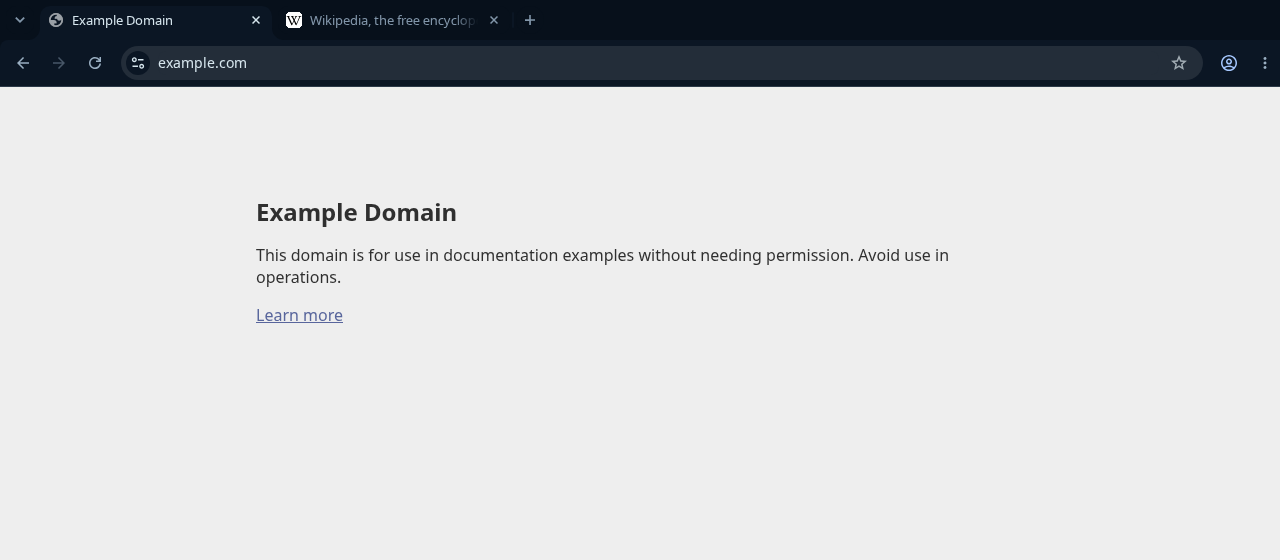
HackerBlue for Chromium is a dark browser theme: a deep navy frame, tabs and toolbar, steel-blue text and one cyan accent — the same design as HackerBlue for Chrome. One payment for the theme, updates included at no extra charge, and up to three personal devices.
hackerblue@dev:~$ hackerblue status chromium
HackerBlue for Chromium Status InstalledInstalled 1.0.0Latest 1.0.0Location /home/you/.local/share/hackerblue/chromium/Hacker BlueUpdate Up to dateLicense HackerBlue for Chromium
The theme
HackerBlue for Chromium colors the browser itself: the window frame and tab strip, the active tab, the toolbar and its icons, the bookmarks bar, the address bar and the new tab page. It sets colors only, so your pages, extensions, fonts and settings are never touched, and web pages keep drawing themselves.
Chrome, Brave and Chromium all load the identical theme format, so this is the same theme as HackerBlue for Chrome — not a separate design, not a fork, the same file. It is added the way Chromium loads a theme of your own: as an unpacked theme you load once from a folder. You do that once; Chromium remembers the folder from then on. It was checked against Chromium 151 on Linux.
See it
What the purchase includes
-
Purchase
One-time
One payment for HackerBlue for Chromium. There is no subscription and nothing renews.
-
Updates
Included
Updates Hacker Blue publishes for this theme come with the licence at no extra charge — a version change never asks you to pay again.
-
Devices
3 active
The licence covers up to three personal devices active at the same time, and you can deactivate one from your account page.
-
Delivery
HackerBlue CLI
The CLI downloads and installs the theme on an authorised device.
Buy HackerBlue for Chromium
The purchase runs on Whop, and Whop shows the price, currency and taxes before you pay. Buying ties the licence to a Hacker Blue account, which you use with Google or an email address and a password.
Buy HackerBlue for Chromium Or get HackerBlue Complete
HackerBlue Complete is the other one-time product: it includes the Chromium theme today and the themes added to Complete later, under the same kind of licence. Pricing compares the two.
Install it with the HackerBlue CLI
After the purchase, the CLI is the whole installation — every command is documented on the CLI page.
Installing needs a licensed account and an authorised device. The CLI downloads the release, verifies its checksum and unpacks it into a folder of its own.
hackerblue login— authorises this computer through your browser. You approve the device while signed in to your Hacker Blue account.hackerblue install chromium— unpacks the theme intohackerblue/chromium/Hacker Bluein your data folder (~/.local/shareon Linux; or the folder--vault PATHnames) and prints the full path. It touches nothing in Chromium itself.- In Chromium open
chrome://extensions, turn on Developer mode (top right), click Load unpacked and choose the folder the CLI printed. Paste the path into the file dialog if it is hidden. Chromium switches to the theme at once and keeps it across restarts. hackerblue update chromium— installs a newer published release under the same licence, with no second purchase. Then click the reload button on the Hacker Blue card inchrome://extensions; restarting Chromium alone does not refresh it.
To go back to Chromium's own look, remove Hacker Blue in chrome://extensions. A folder of yours with the same name is never overwritten. hackerblue status chromium reports what is installed here, the latest published version and the update state.
Release notes
What changed in each release. Updates are included with the licence.
Each release has its own version. Versions follow semantic versioning:
- Major — the look changes noticeably.
- Minor — support for new parts of the app.
- Patch — fixes.
The newest release is first.
-
1.0.028 September 2026
First release.
Terms, support and the rest of the family
The rest of the family
31 themes are available now.

Claude Code
A theme for the Claude Code terminal.

Gemini CLI
A theme for the Gemini CLI terminal.

OpenCode
A theme for the OpenCode terminal.

Codex CLI
A theme for the Codex CLI terminal.

VS Code
An editor theme with matching syntax colors.

Cursor
A theme for the Cursor editor.

Zed
An editor theme for Zed.

JetBrains
An editor theme for JetBrains IDEs.

Neovim
A colorscheme for Neovim.

Sublime Text
A color scheme for Sublime Text.
kitty
A colors-only terminal theme with bright cyan accents.

Ghostty
A theme for the Ghostty terminal.

WezTerm
A color scheme for the WezTerm terminal.

Alacritty
A color scheme for the Alacritty terminal.

Warp
A theme for the Warp terminal.

Konsole
A color scheme for KDE's Konsole terminal.

foot
A color scheme for the foot Wayland terminal.

Windows Terminal
A JSON color scheme for Windows Terminal.

tmux
Status line and pane colors for tmux.

btop
A theme for the btop system monitor.

lazygit
A theme for the lazygit terminal UI.

Yazi
A theme for the Yazi file manager.

Starship
A prompt theme for Starship.

Obsidian
The editor theme: deep navy, steel-blue text, one cyan signal.

Chrome
A browser theme for Chrome's frame and toolbar.

Firefox
A browser theme for Firefox's toolbars and menus.

Brave
A browser theme for Brave's frame and toolbar, on the same design as Chrome.

Omarchy
One colour theme for the whole Omarchy desktop: windows, bar, launcher, notifications and lock screen.

Hyprland
Window borders, gaps, and bar colors for Hyprland.

KDE Plasma
A color scheme for the KDE Plasma desktop.